[번역] React 조정에서 bailout은 어떻게 동작하나요?
React Internals Deep Dive - EP13
![[번역] React 조정에서 bailout은 어떻게 동작하나요?](https://cdn.hashnode.com/res/hashnode/image/upload/v1714965629533/280cad88-5d61-46bb-8064-f729f9891d21.jpeg)
영문 블로그 글을 번역했습니다. 허가를 받으면 시리즈를 이어갈 예정입니다.
원문링크: https://jser.dev/react/2022/01/07/how-does-bailout-work
ℹ️React Internals Deep Dive 에피소드 13, 유튜브에서 제가 설명하는 것을 시청해주세요.
⚠React@18.2.0기준, 최신 버전에서는 구현이 변경되었을 수 있습니다.
💬 역자 주석: Jser의 코멘트는 ❗❗로 표시 해뒀습니다.
그 외 주석은 리액트 소스 코드 자체의 주석입니다.
... 은 생략된 코드입니다.
데모
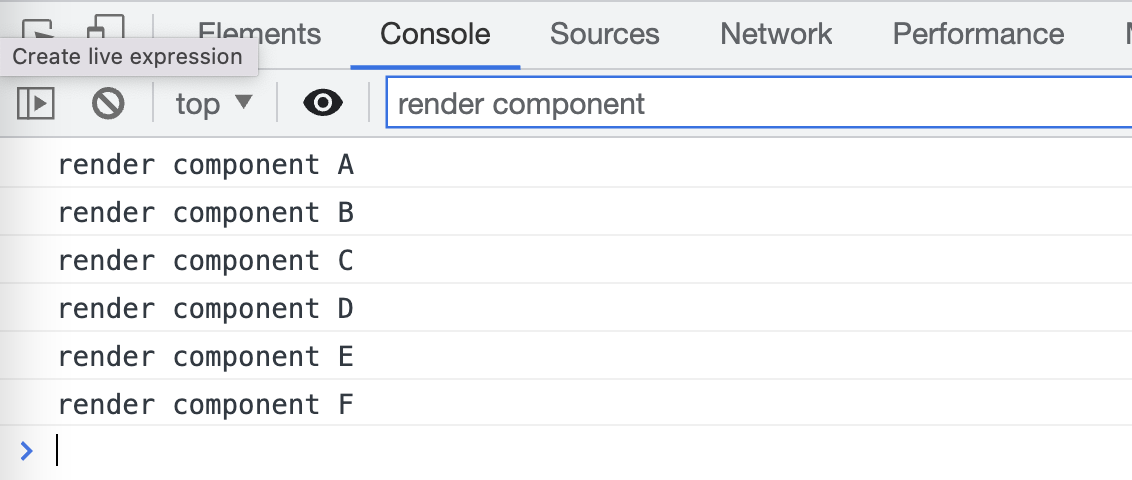
이 데모 링크를 열면, 클릭할 때마다 숫자가 증가하는 유명한 버튼이 있습니다.
개발 콘솔을 열면 reander component의 로그를 필터링할 수 있습니다.
Element 탭에서 React 코드를 확인할 수 있습니다.
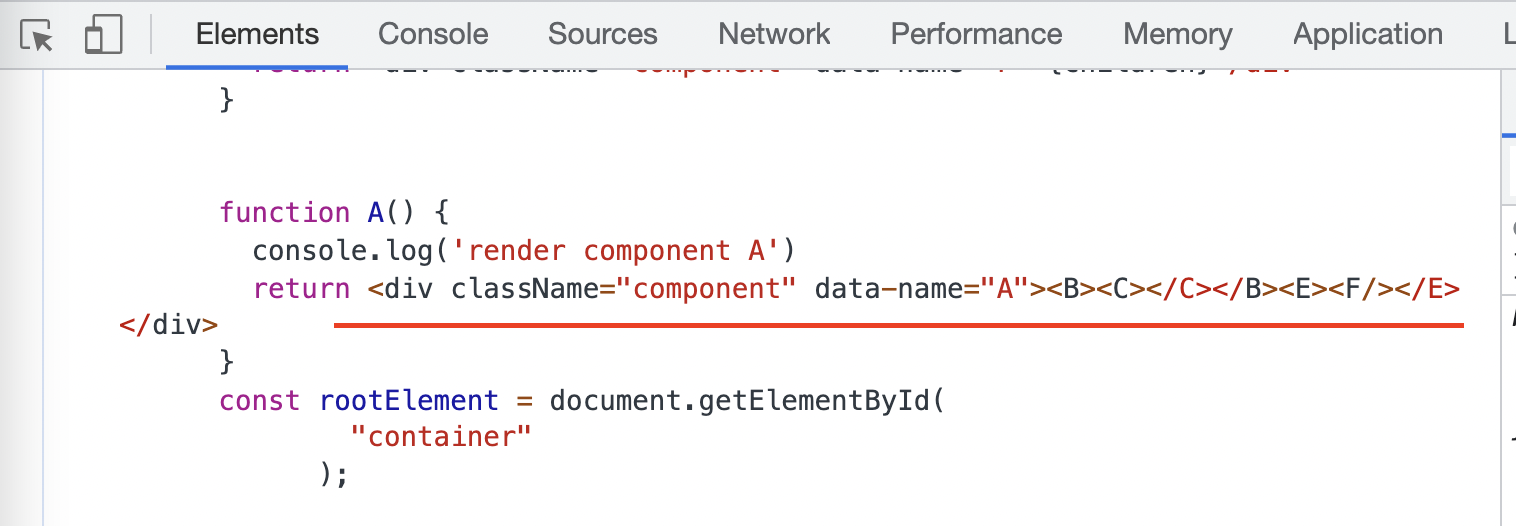
구조는 간단합니다.
<A>
  <B>
    <C>
      <button/>
      <D/>
    </C>
  </B>
  <E>
    <F/>
  </E>
</A>
이제 버튼을 클릭하면 앞서 비디오 시리즈에서 이야기했듯이 setState가 실제로 루트에서 조정(reconciliation)을 트리거하므로 이론적으로는 모든 컴포넌트가 리렌더링되어야 하지만 C와 D에 대해서만 리렌더링되는 것을 볼 수 있습니다.
lanes & childlanes
개발자 콘솔에서 필터를 지우면 이미 입력한 로그를 볼 수 있으며, 이를 클릭하면 소스 코드를 볼 수 있습니다.
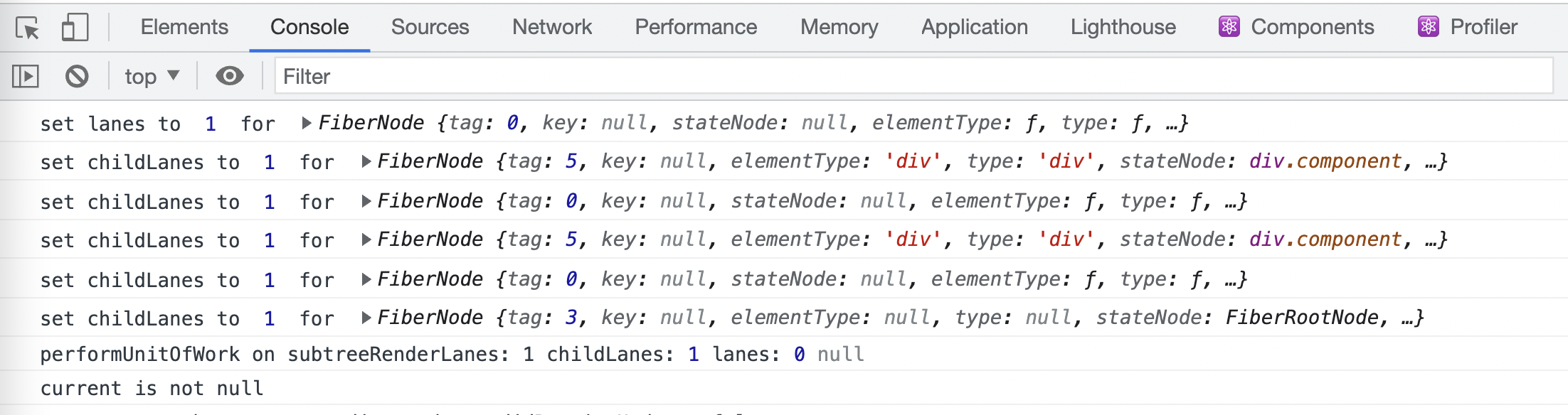
버튼을 클릭하면 여러 개의 lanes와 childelanes의 설정을 볼 수 있습니다.
리액트 코드의 setCount()에 해당하는 dispatchSetState()에서, scheduleUpdateOnFiber()의 호출을 찾을 수 있습니다(소스).
export function scheduleUpdateOnFiber(
  fiber: Fiber,
  lane: Lane,
  eventTime: number,
): FiberRoot | null {
  checkForNestedUpdates();
  const root = markUpdateLaneFromFiberToRoot(fiber, lane);
  if (root === null) {
    return null;
  }
  // Mark that the root has a pending update.
  markRootUpdated(root, lane, eventTime);
  ...
}
네, 우리는 이미 markUpdateLaneFromFiberToRoot()를 찾았습니다.(소스)
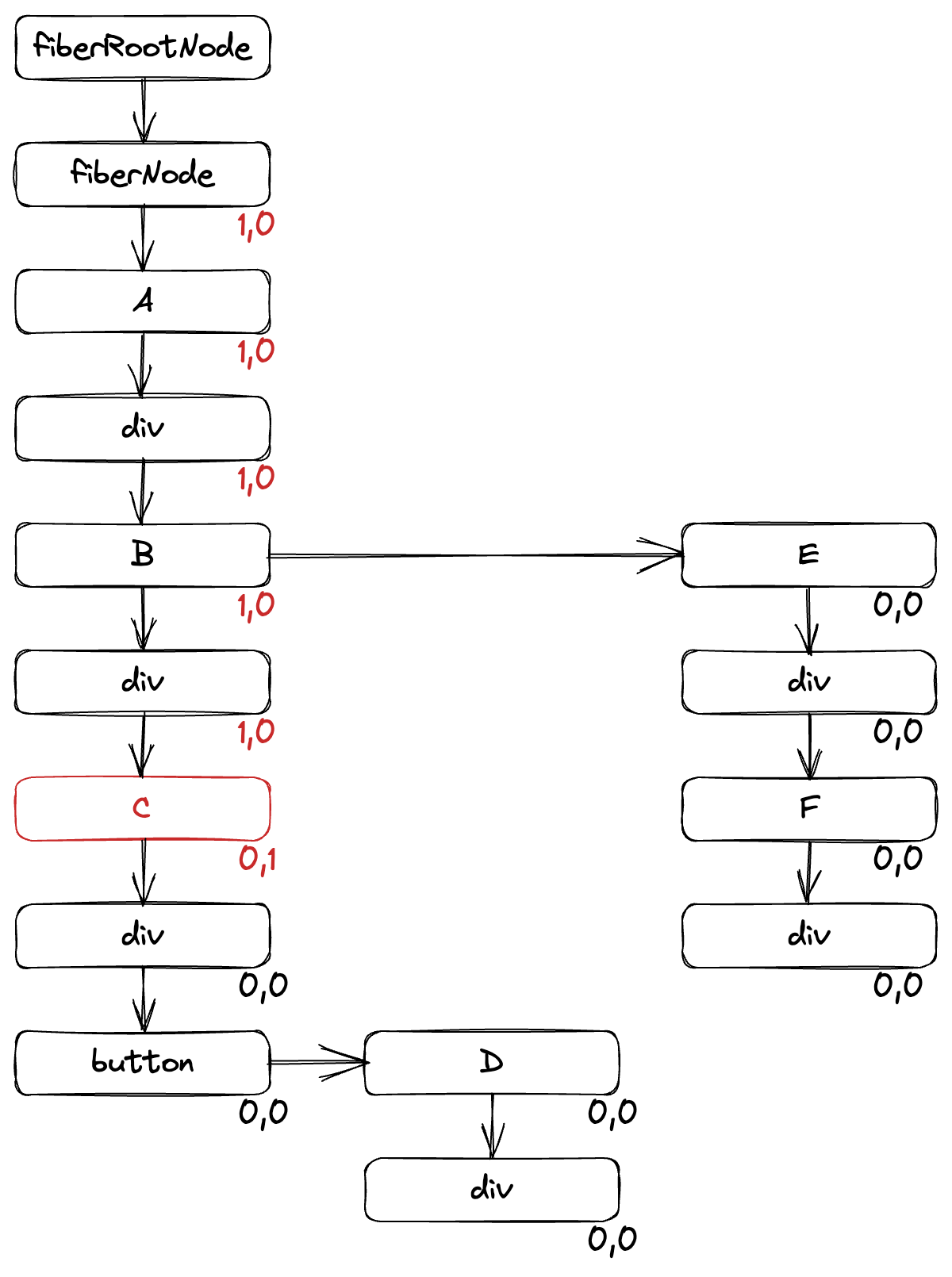
이것은 두 가지 작업을 수행합니다.
대상 파이버의
lanes를 설정하여 자체적으로 표시하는 작업이 있습니다.모든 조상 파이버의
childLanes를 설정하여 자손이 해야 할 일이 있음을 표시합니다.
이제 버튼을 클릭한 후 lanes와 childLanes를 포함하여 파이버 그래프를 그리면 다음과 같이 됩니다(첫 번째 숫자는 childLanes).
performUnitOfWork()
scheduleUpdateOnFiber()는 ensureRootIsScheduled()를 통해 조정 콜백을 예약하는데, 간단히 말하면 모든 파이버 노드에서 performUnitOfWork()를 계속 실행하는 것입니다.(소스)
function workLoopConcurrent() {
  // Perform work until Scheduler asks us to yield
  while (workInProgress !== null && !shouldYield()) {
    performUnitOfWork(workInProgress);
  }
}
shouldYield() 는 앞으로 다룰 만료(expiration)에 관한 또 다른 주제입니다. 지금은 performUnitOfWork()에만 집중해 보겠습니다.
그 안에는 beginWork()가 더 일찍(bailout) 중지할 수 있는지 여부를 확인하는 실제 로직이 있습니다.(소스)
function beginWork(
  current: Fiber | null,
  workInProgress: Fiber,
  renderLanes: Lanes,
): Fiber | null {
  if (current !== null) {
    const oldProps = current.memoizedProps;
    const newProps = workInProgress.pendingProps;
    if ( // ❗❗
      oldProps !== newProps || // ❗❗
      hasLegacyContextChanged() // ❗❗
    ) { // ❗❗
      // If props or context changed, mark the fiber as having performed work.
      // This may be unset if the props are determined to be equal later (memo).
      didReceiveUpdate = true; // ❗❗
    } else {
      // Neither props nor legacy context changes. Check if there's a pending
      // update or context change.
      const hasScheduledUpdateOrContext = checkScheduledUpdateOrContext(
        current,
        renderLanes,
      );
      if (
        !hasScheduledUpdateOrContext &&
        // If this is the second pass of an error or suspense boundary, there
        // may not be work scheduled on `current`, so we check for this flag.
        (workInProgress.flags & DidCapture) === NoFlags
      ) {
        // No pending updates or context. Bail out now.
        didReceiveUpdate = false; // ❗❗
        return attemptEarlyBailoutIfNoScheduledUpdate(
          current,
          workInProgress,
          renderLanes,
        );
      }
      ...
    }
  } else {
    ...
  }
  workInProgress.lanes = NoLanes;
  switch (workInProgress.tag) {
    case FunctionComponent: {
      const Component = workInProgress.type;
      const unresolvedProps = workInProgress.pendingProps;
      const resolvedProps =
        workInProgress.elementType === Component
          ? unresolvedProps
          : resolveDefaultProps(Component, unresolvedProps);
      return updateFunctionComponent(
        current,
        workInProgress,
        Component,
        resolvedProps,
        renderLanes,
      );
    }
    ...
  }
}
코드만 봐도 여기서 어떤 작업이 수행되고 있는지 대략적으로 알 수 있습니다.
props와 context가 변경되면
didReceiveUpdate = true를 계속 사용해야 합니다.그렇지 않은 경우,
checkScheduledUpdateOrContext()를 통해 예약된 업데이트가 있는지 확인합니다.예약된 업데이트가 없는 경우,
attempEarlyBailoutIfNoScheduledUpdate를 통해 bailout을 시도합니다.업데이트가 필요한 경우, 함수형 컴포넌트에 대해
updateFunctionComponent()가 호출됩니다.
한 가지 주목해야 할 점은 beginWork()의 반환값에 따라 performUnitOfWork()의 다음 단계가 결정된다는 것입니다. null이면, 작업을 중지하고 끝내야 한다는 뜻입니다.(소스)
checkScheduledUpdateOrContext()는 간단하며, lanes만을 확인합니다.
function checkScheduledUpdateOrContext(
  current: Fiber,
  renderLanes: Lanes,
): boolean {
  const updateLanes = current.lanes;
  if (includesSomeLane(updateLanes, renderLanes)) {
    return true;
  }
  ...
}
checkScheduledUpdateOrContext()에서, bailoutOnAlreadyFinishedWork()가 호출되고, childLanes가 체크 됩니다.(출처)
이제 모든 것이 명확해졌습니다.
기본적으로 React는 모든 파이버에 연결됩니다, 루트에서부터 모든 파이버까지말이죠.
하지만 일부 파이버에서 props 변경 없고, 컨텍스트 변경이 없고
lanes및childLanes가 모두 0인 경우 bailout을 수행합니다.
개발 콘솔로 돌아가면, A B E F가 리렌더링되지 않는 이유를 이해할 수 있습니다.
A와 B: 업데이트가 발견되지 않아 다시 렌더링할 수 없으므로 updateFunctionComponent()(소스)에서 bailout을 시도합니다. 하지만 자식 C는 해야 할 일이 있으므로 계속 C로 진행합니다.
E: beginWork()에서 bailout
F: E의 bailout 이후, F는 전혀 확인되지 않습니다.
잠깐, D는 왜 리렌더링 되는거죠?
좋은 질문입니다.
<D/>가 C에 있기 때문에 C가 리렌더링되면 새로운 요소인 D가 생성되고 props가 변경되기 때문입니다.
좀 더 자세히 설명해 드리겠습니다.
C에 대한 작업이 발견되면 C가 함수형 컴포넌트이므로 beginWork()에서 updateFunctionComponent()가 트리거됩니다.
함수형 컴포넌트를 업데이트하려면 먼저 실행(리렌더링)하여 새 엘리먼트를 가져온 다음 reconcileChilren을 실행합니다.(소스)
nextChildren = renderWithHooks(
  current,
  workInProgress,
  Component,
  nextProps,
  context,
  renderLanes
);
reconcileChildren(current, workInProgress, nextChildren, renderLanes);
이 경우, children은 button과 D의 배열이며, 마지막으로 reconcileChildrenArray()로 이동합니다.(소스)
여기에서 새 파이버 배열을 업데이트하는 코드를 볼 수 있습니다.
for (; oldFiber !== null && newIdx < newChildren.length; newIdx++) {
  const newFiber = updateSlot(
    returnFiber,
    oldFiber,
    newChildren[newIdx],
    lanes,
  );
  ...
updateSlot() 으로 드릴다운한 다음 updateElement()로 이동합니다.(소스)
updateElement()에서 아래 함수는 파이버를 생성(또는 재사용)하는 데 사용됩니다.
function useFiber(fiber: Fiber, pendingProps: mixed): Fiber {
  // We currently set sibling to null and index to 0 here because it is easy
  // to forget to do before returning it. E.g. for the single child case.
  const clone = createWorkInProgress(fiber, pendingProps);
  clone.index = 0;
  clone.sibling = null;
  return clone;
}
createWorkInProgress로 가보면, pendingProps가 사용되는 코드를 볼 수 있습니다.
workInProgress = createFiber(
  current.tag,
  pendingProps,
  current.key,
  current.mode,
);
// or
workInProgress.pendingProps = pendingProps;
맞습니다, <D/>는 C()가 실행 될 때마다 생성되고, pendingProps의 경우 비록 값은 같을지라도 같은 객체가 아니기 때문에 매번 다릅니다.
그래서 beginWork()에서는, oldProps와 newProps가 같지 않으므로 업데이트로 처리됩니다.
if (
 oldProps !== newProps ||
  hasLegacyContextChanged()
) {
 didReceiveUpdate = true;
}
자식들을 props로 옮기면 bailout으로 이어집니다
위의 분석을 통해, <D/>를 C의 props에 있는 자식으로 이동하면 D에 대한 bailout이 발생하는 이유도 알 수 있습니다.
코드 변경사항은 다음과 같습니다.
function C({children}) {
  console.log('render component C')
  const [count, setCount] = React.useState(0)
  const increment = React.useCallback(
    () => setCount(count => count + 1)
  , [])
- return <div className="component" data-name="C"><button onClick={increment}>{count}</button><D/></div>
+ return <div className="component" data-name="C"><button onClick={increment}>{count}</button>{children}</div>
}
function A() {
  console.log('render component A')
- return <div className="component" data-name="A"><B><C></C></B><E><F/></E></div>
+ return <div className="component" data-name="A"><B><C><D/></C></B><E><F/></E></div>
}
두 번째 데모 링크로 이동하여 다시 콘솔을 열고 버튼을 클릭하면 이번에는 D가 렌더링되지 않는 것을 확인할 수 있습니다.
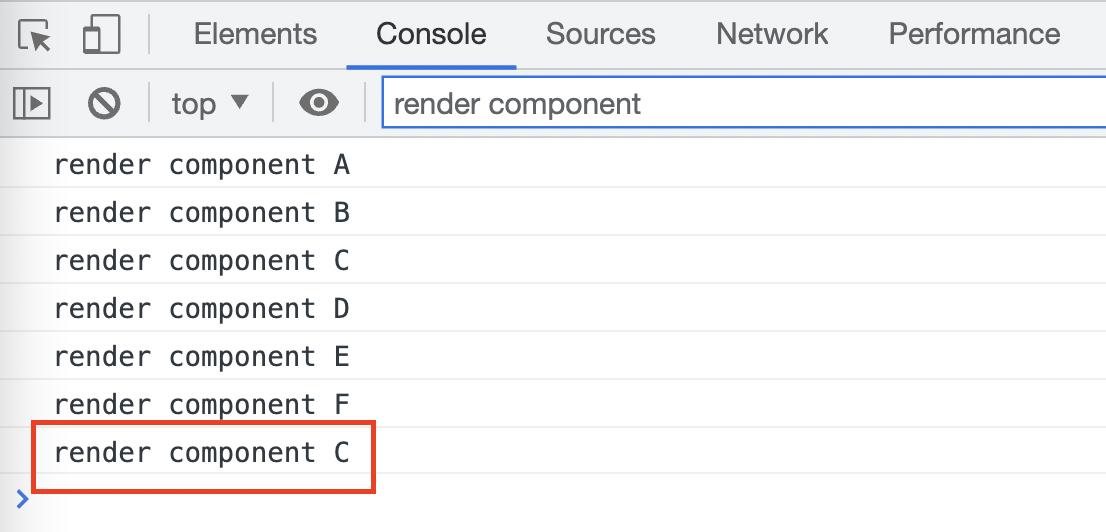
왜 그럴까요? 간단합니다.
C()가 실행될 때 children이 인수로 전달되므로 createWorkInProgress()에서 pendingProps는 정확히 동일하므로 bailout이 발생해서 입니다.
(원본 게시일: 2022-01-07)
About the author
Software engineer for web tech. Interested in sustainable growth as software engineer.
Comments
Join the discussionNo comments yet. Be the first to comment.
React Internals Deep Dive 번역 시리즈
[번역] 리액트 내부 작동원리에 대한 JSer의 시리즈입니다. https://jser.dev/series/react-source-code-walkthrough

